
The electric company already emails you the bill. So does the card issuer, the water department and the internet provider. Instead of reading each one and typing the number in, forward it.
Forward it to bills@paydayplan.app
Send the bill email to bills@paydayplan.app from the address you sign in to Payday Plan with. That's how it knows which household the bill belongs to.
If you'd rather not forward by hand, a mail rule works too. Set your email to forward anything from your utility's billing address, and new bills arrive on their own.
What it reads
Bill emails are cluttered. The number you need sits next to last month's balance, a credit, a payment received and an offer to save $5 by going paperless. Payday Plan reads the email and looks for:
- Which bill it is, from the subject, the sender and the sender's domain.
- The amount due. Not the previous balance, not the last payment. For a credit card or loan, the minimum payment.
- The due date.
- Autopay hints, like "this amount will be drafted on" or "scheduled payment".
So an email that says something like "Your bill of $212.45 is due Nov 18" (an example, not your bill) turns into $212.45, due the 18th, for the bill it matches in your plan.
It's read by Payday Plan's own reader, with patterns and word lists. No AI reads your bill emails. When it can't tell which bill or which amount, it says so instead of guessing.
It lands under Emailed bills
Each forwarded email shows up under Emailed bills (in the menu under your name, or under More on a phone) as one of two things:
- This month's amount for a bill you already have. Your plan stays the same; this month just records the real number. If you planned $180 for electric and the bill says $212.45, this month says $212.45.
- Add bill when it's from a biller that isn't in your plan yet.
A line also appears in Where things stand on The Plan ("A bill came in by email", with a Review button), so you'll see it next time you open the app.
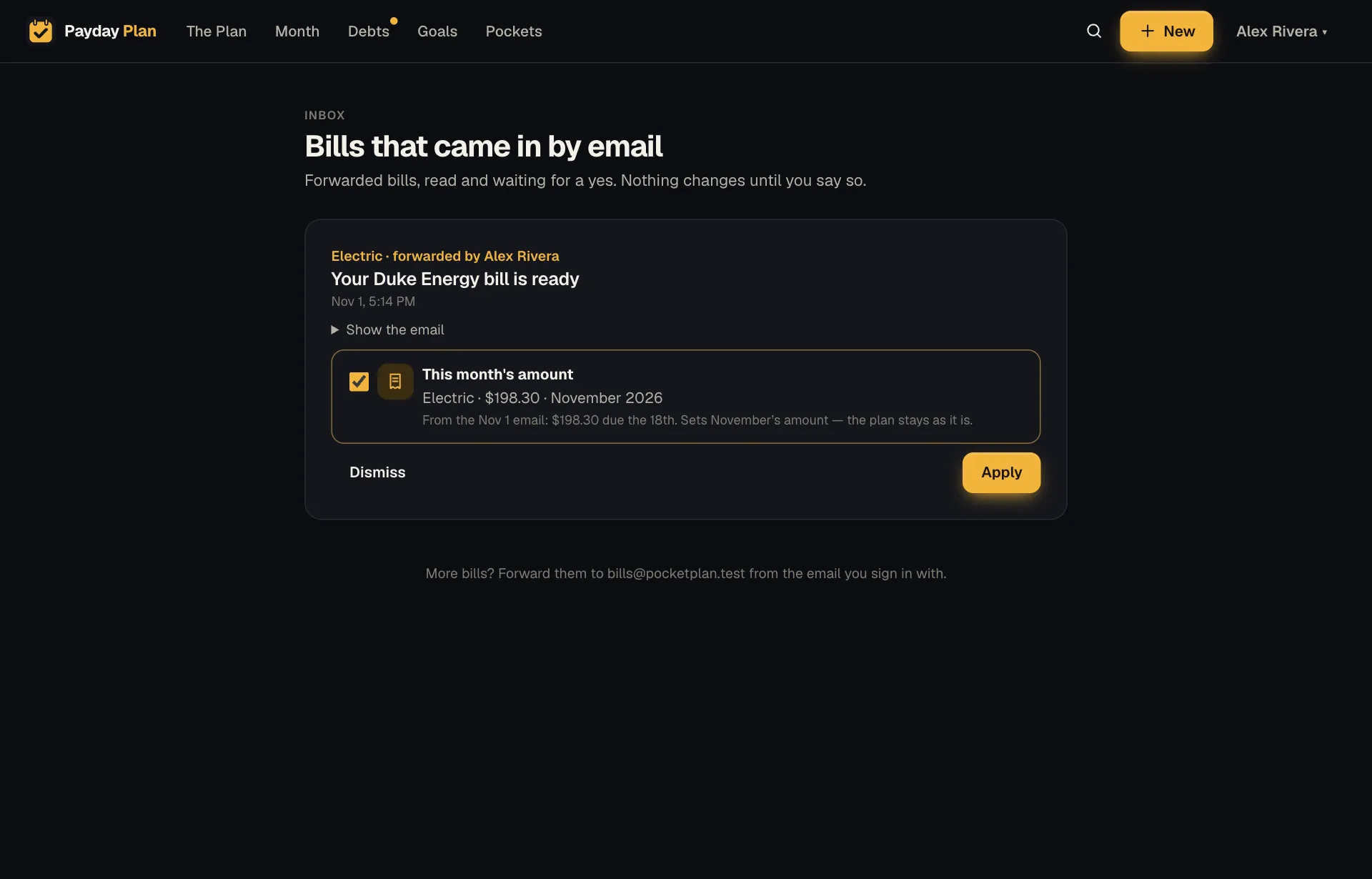
Nothing applies until you say so
An emailed bill is a suggestion. Someone in the household reviews it and presses Apply or Dismiss. Nothing in your plan changes on its own because an email arrived.
Try it: Find last month's water bill in your inbox and forward it to bills@paydayplan.app. Then open Emailed bills and see what it found.
A few sensible rules
- The same email twice is one item. Forward it again by accident and you won't get a duplicate.
- Only your household's addresses count. Mail has to come from someone who signs in to your household (a "+tag" version of your address is fine).
- Spoofed senders are refused. If the receiving mail server says a message failed every authenticity check (SPF, DKIM and DMARC), it's turned away. Typing your address into someone else's "From" line isn't enough to get a bill into your plan.
Why bother
It's a small thing. But "open email, find the number, open the app, find the bill, type the number" becomes "forward, then tap Apply later." Across a dozen bills a month, that adds up to fewer evenings spent squinting at PDFs.