
Most budget apps want you to fill in a form for every bill. Payday Plan has forms too, but you rarely need them. You can just say what changed.
Type it the way you'd say it
There's a box at the top of The Plan (Tell Payday Plan what changed, then Go), another under + New (the Just describe it box), and one in the Welcome steps. Type what's going on, in your own words:
Mortgage $3,600 on the 1st, autopay. I get paid $3,000 every other Friday.
Netflix went up to $18. Skip dance this month.
Hulu and Peacock are $8 each.
That last one becomes two bills, not one bill called "Hulu and Peacock." And "Netflix went up. It's $18 now. Skip it next month" is read as two changes to Netflix, because "it" means Netflix.
You can also paste a list, or use Attach a list (CSV) for a file with Name, Amount, Due and Autopay columns. Each row becomes its own line.
See what it understood as you type
While you're typing, a So far: line shows what's been picked up: an amount here, a due day there, "autopay" noticed. If it's misreading you, you'll know before you finish the sentence. When you're done, press Read it.
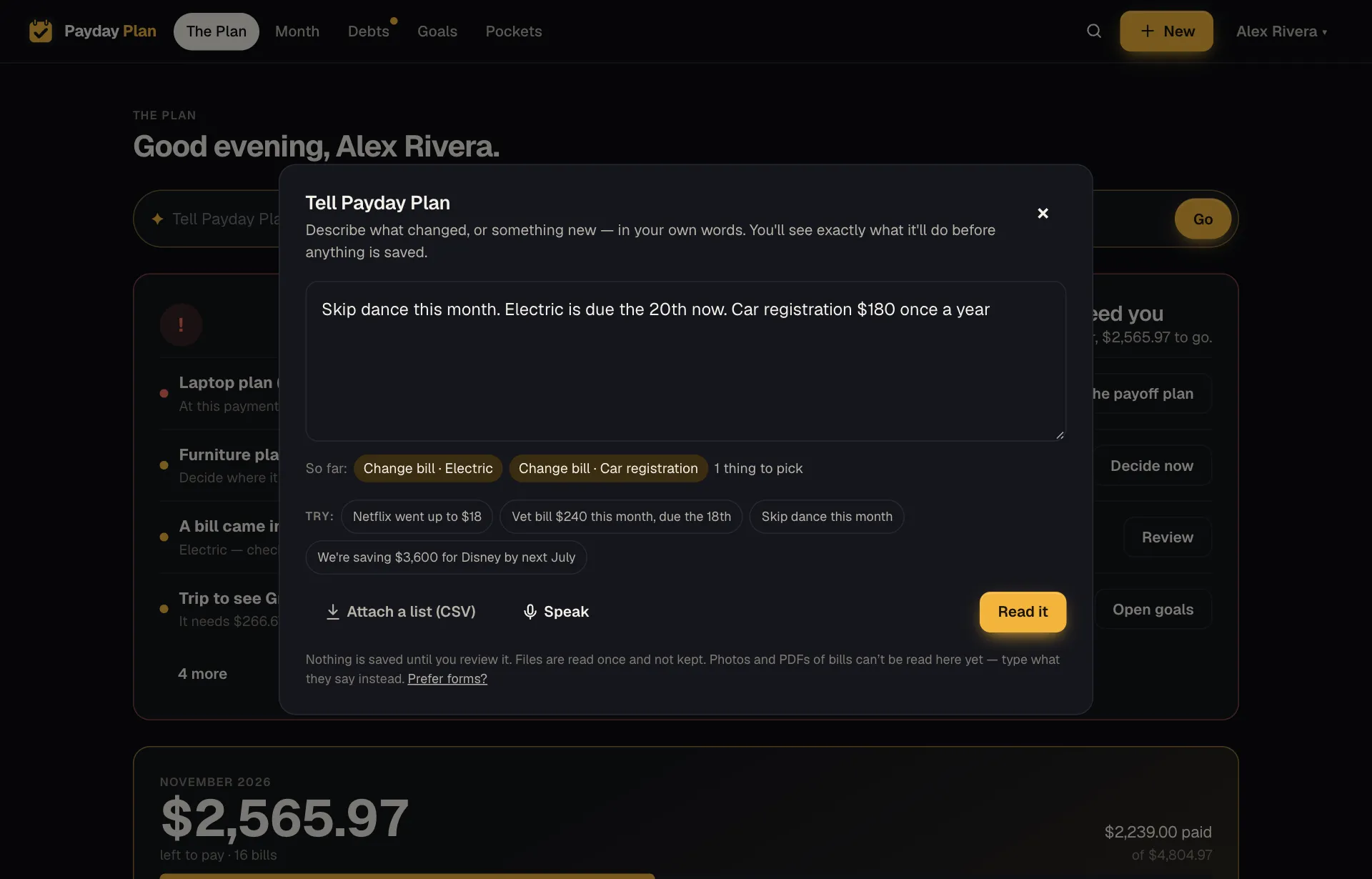
Nothing saves until you say so
When you're done, you get a review: each proposed change on its own line, with a short reason. Add this bill. Update that one. Skip this one for November. Tick what's right, untick what isn't, then press Make this change (or Make 3 changes, counting whatever is ticked). Start over throws the reading away.
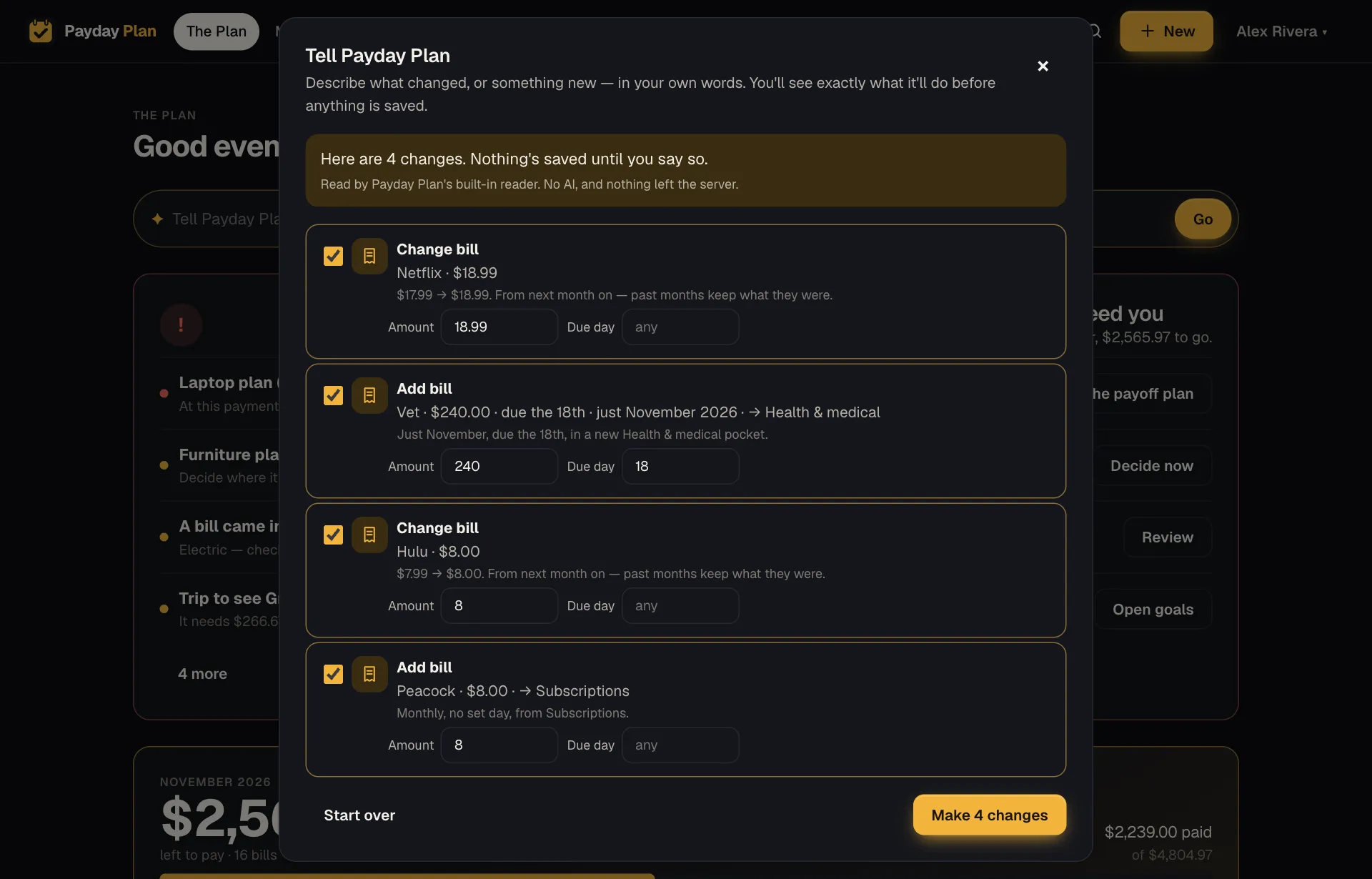
Changed your mind afterwards? Undo all reverses the whole batch for 24 hours. Added things are removed, changed values go back, and a payment you recorded is taken back the same way it went in, so a debt's balance comes back too.
When two bills could match
If you type "skip dance" and the household has both Dance tuition and Dance comp, Payday Plan doesn't guess. It shows a button for each, plus A new bill called… where that makes sense, and Neither. Pick one.
It remembers your pick. Next time, "dance" means Dance comp without asking. If that stops being true, Settings → Words Payday Plan learned lets you forget it.
This month's amount, not the plan
Some bills move around. Say:
The electric bill came in at $212.
That records this month's amount for the electric bill without changing what you plan for it every month. Your plan stays $180 (or whatever it was). This month just says $212.
Speak instead of type
On phones and browsers that support dictation, there's a microphone button, Speak. Talk, and it types for you. The same reader takes it from there.
Try it: Next time you open a bill with a new amount on it, don't open the bill. Type "Water came in at $64" on The Plan and press Make this change.
Who's doing the reading
This part matters, so plainly:
Everyday sentences are read by Payday Plan's own built-in reader, on our server. It's not AI. It's a word list and a set of rules: it pulls out amounts, due days, rates, dates, how often and autopay, then matches names against your plan. No key, no outside service, nothing sent anywhere. The "So far:" preview only ever uses this reader.
Claude, from Anthropic, is optional. It's used only for things the built-in reader can't do: photos and PDFs of bills, and sentences the reader couldn't place. And only if it's switched on. If it's off, the reader tells you which bits it couldn't place, and you can rephrase or use a form.
Every review says which one read it, so you're never left wondering.